Research Agent
"Multi-source deep research — the report writes itself while you watch."
"Multi-source deep research — the report writes itself while you watch."
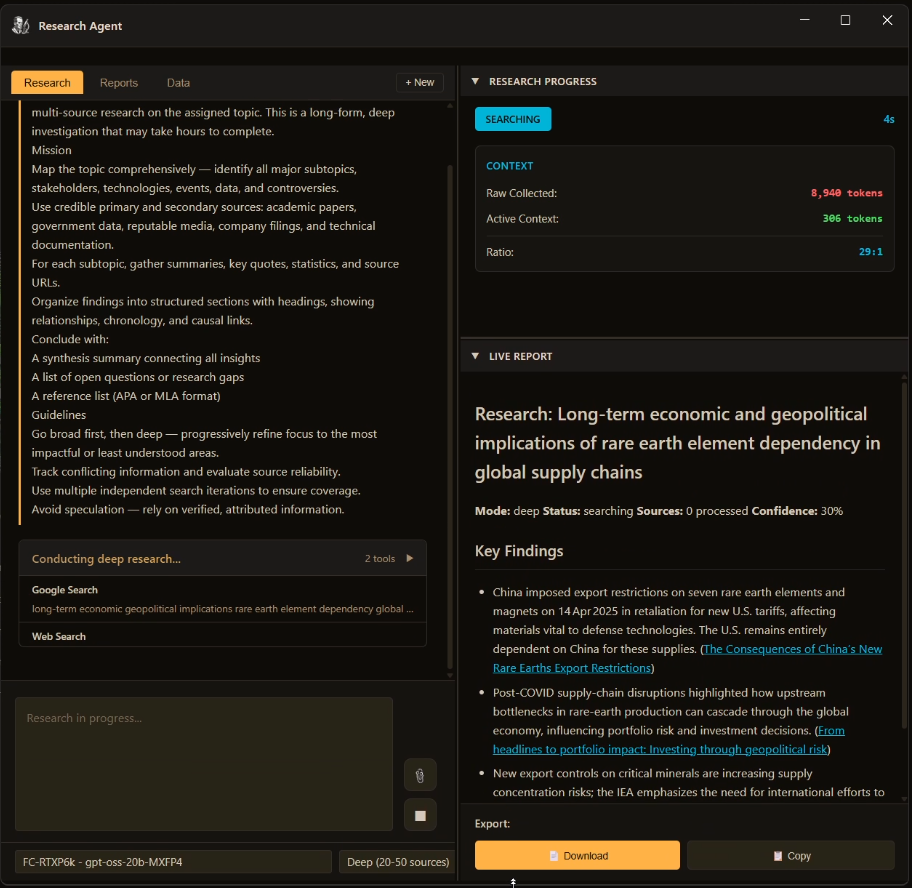
Every research session starts with a choice of depth. The agent reads the brief, selects sources, and begins writing. The report builds in real time on the right panel — you can watch it take shape or come back when it is done.
The Research Progress panel tracks two numbers that tell the whole story: raw tokens collected vs. active context in use. The agent pulls in everything it can find, then compresses aggressively — keeping only the information that advances the research brief.
This is why the Research Agent can cover 50 sources without burning through your context window. It is not retrieving whole pages — it is extracting the fragments that matter and stitching them into a coherent document.
The live session panel on the left shows every tool call as it happens: each search query issued, each URL fetched, each note added to the draft. The collapsible tool-call list expands to show the full detail. The confidence percentage, source count, and search status update in real time.
Every source the agent reads is logged in the Sources panel: URL, page title, domain, the time it was fetched, and a quality rating. Nothing is cited without being traceable.
Marathon research sessions can run for hours. Once a session finishes you can save the report, then continue it later — the agent picks up from where the first run ended and keeps going, extending coverage of the same topic without starting over.
The Data tab is a workspace-wide document search engine. Every report you've saved, every document in your workspace — the agent can search it semantically. Results are grouped by report, then document, then the specific chunk that matched.
Click a result and it opens the original document in the editor at the exact character position where the match occurred. No manual scrolling, no copy-pasting. If the source is a PDF it opens in the PDF viewer.
Previous searches are remembered across sessions. Re-run a search from last week or refine a query you ran yesterday without retyping it.
"Set the topic. Set the depth. The Research Agent handles the rest — searching, reading, compressing, and writing a structured report with sources. You get the answer, not the browser history."
Any topic. Any depth. Report delivered live.
Get FrankenCoder Back to all features →