Node Agent
"Visual programming powered by AI — 39 nodes, zero boilerplate, runs when you’re ready."
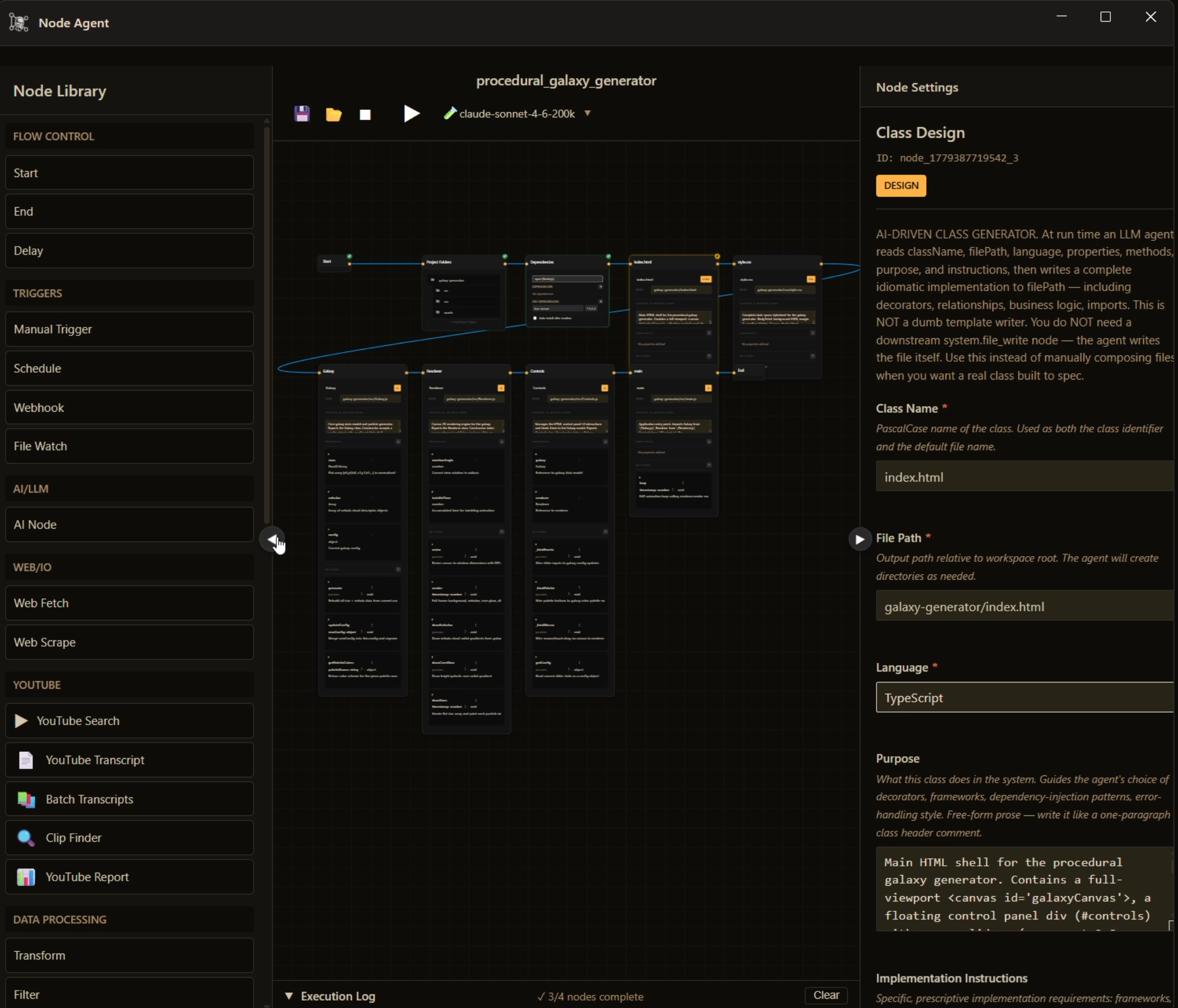
"Visual programming powered by AI — 39 nodes, zero boilerplate, runs when you’re ready."
The Node Agent is a three-panel visual canvas: a node library on the left, the flow canvas in the center, and a properties panel on the right. Tell the agent what you want built — a web scraper, a report pipeline, a full application — and it designs the flow, drops in the correct nodes, wires the connections, and produces a runnable program.
You can build or edit manually at any point. Drag nodes from the library, connect them with Bezier wires, configure each node in the properties panel, and run. The agent builds on top of the same canvas you use. There is no separate "AI mode".
Every node connects to the FrankenCoder daemon for LLM calls, terminal access, web, YouTube, and file I/O. Custom node types can be registered with their own fields and handle configuration, and they persist across sessions.
The Class Design node is not a template filler. It is an intent-driven code generator. Describe the class: its file path, language, properties, methods, purpose, and implementation requirements. At run time the agent reads that spec and writes a complete, idiomatic implementation directly to disk — decorators, imports, dependency injection, business logic, error handling, all of it.
Chain a Folders node to create the project structure first. Chain a Dependencies node to install packages. Chain as many Class Design nodes as the project needs. The agent scaffolds and writes the entire application in one flow run.
The Class Design node produces real code, not filled-in stubs. The agent writes the file itself — no downstream write node required.
Flows are named and stored with full metadata: last modified, node count, canvas state including zoom and pan position. Both you and the agent can save and load them. Export to JSON to share or back up. Import to restore. Preset flows ship out of the box.
Execution is transparent. Every node gets its own status: pending, running, passed, failed, needs_human, or skipped. The execution log at the bottom is timestamped and expandable — click any entry to highlight the corresponding node on the canvas. Validation runs before execution, catching orphan nodes, cycles, and a missing start node before anything runs.
The Node Agent can hand off to any other FrankenCoder agent mid-flow. In the demo above: after writing all source files and installing dependencies, the Node Agent calls the Browser Agent to open the generated application and confirm it runs.
Sequential or parallel branch execution. Stop button halts mid-run. The agent can flag any node as needs_human and pause for your input before continuing.
"Describe a procedural galaxy generator. The Node Agent designs the flow, scaffolds the project, writes every source file, installs the dependencies, and calls the Browser Agent to confirm it runs. Zero manual steps."
Describe a task. Watch the agent wire it up. Run it.
Get FrankenCoder Back to all features →