Cyber Agent

94 Security Tools.
One Conversation.

"Point it at anything on your network. It tells you what's wrong, why it matters, and what to fix first."

94 Security Tools
7 Workbench Tabs
Real-Time Threat Watcher
Real Findings

The Workbench

A full security suite, docked in your IDE

The Cyber Panel floats over your workspace. Seven tabs give you everything from live packet capture to CVE lookups without leaving the editor. The Watcher runs silently in the background and interrupts you only when something is actually wrong.

FrankenCoder Cyber Agent panel showing active security analysis session
Cyber Agent
Active security analysis session
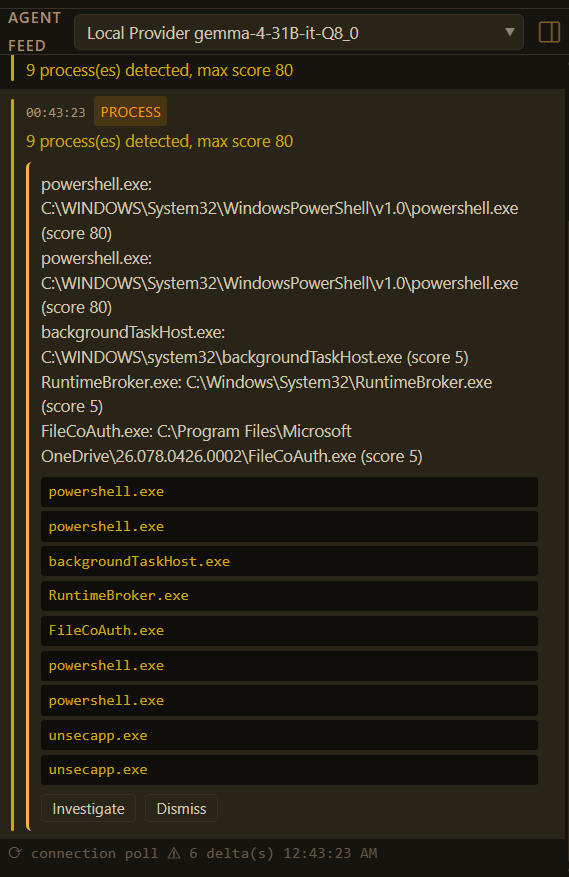
FrankenCoder threat watcher agent feed showing 9 suspicious processes detected including four powershell.exe instances scored at 80 with Investigate and Dismiss actions
Threat Watcher — Agent Feed
9 process(es) detected — max score 80 — powershell.exe x4 flagged

How the Audit Started

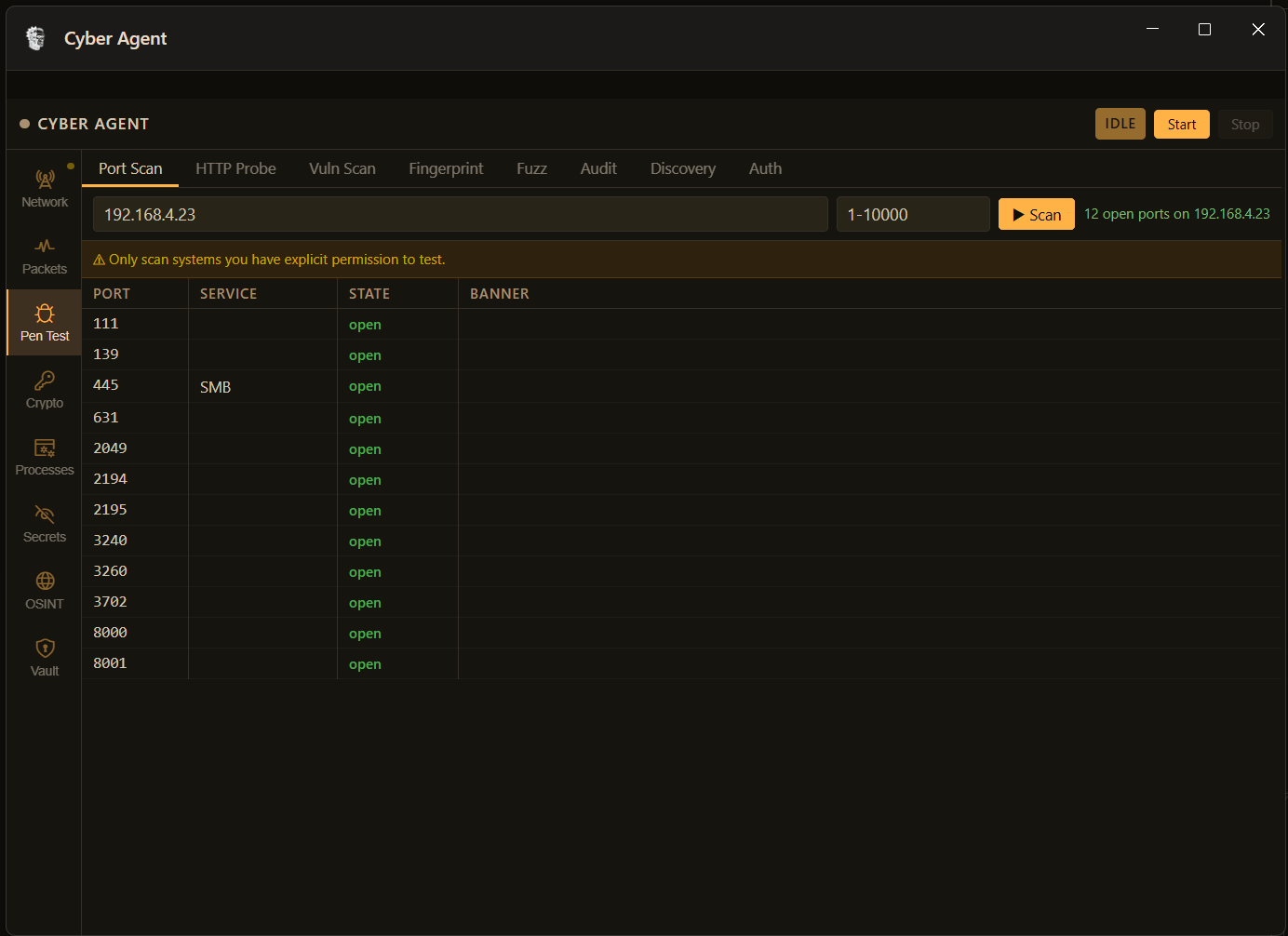
12 open ports. Step one of the NAS audit.

Before the findings below, the Cyber Agent ran a port scan. Twelve listening services on 192.168.4.23 — the admin panel on 8000, SMB on 445, NFS on 2049, CUPS on 631. Each open port is an attack surface. The agent flags, categorises, and investigates each one automatically.

FrankenCoder port scanner targeting 192.168.4.23 showing 12 open ports including SMB on 445, NFS on 2049, CUPS on 631 and admin panel on port 8000
Pen Test — Port Scan
target: 192.168.4.23 — range: 1–10000 — 12 open ports found

NAS audit — 192.168.4.23

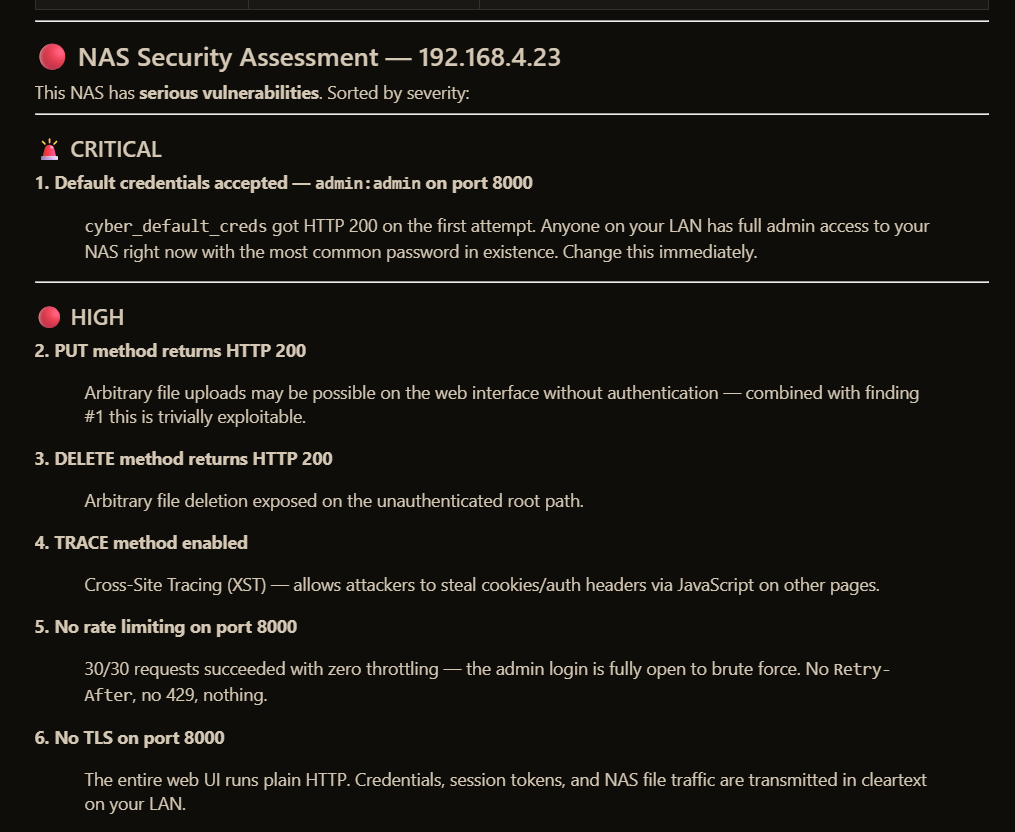
We ran the Cyber Agent against a NAS on a home LAN. One prompt. Under two minutes. It found admin:admin live on port 8000, arbitrary file write via unauthenticated PUT, and a 15-year-old CVE still shipping in current NAS firmware. These are real findings from a real device — not a demo script, not a synthetic target.

1 Critical 5 High 4 Medium 3 Low
NAS security assessment showing critical default credential finding admin:admin and high severity HTTP method exposure including PUT DELETE TRACE with no rate limiting and no TLS
Critical & High
admin:admin — PUT/DELETE/TRACE — no rate limit — no TLS
CRITICAL + 5 HIGH
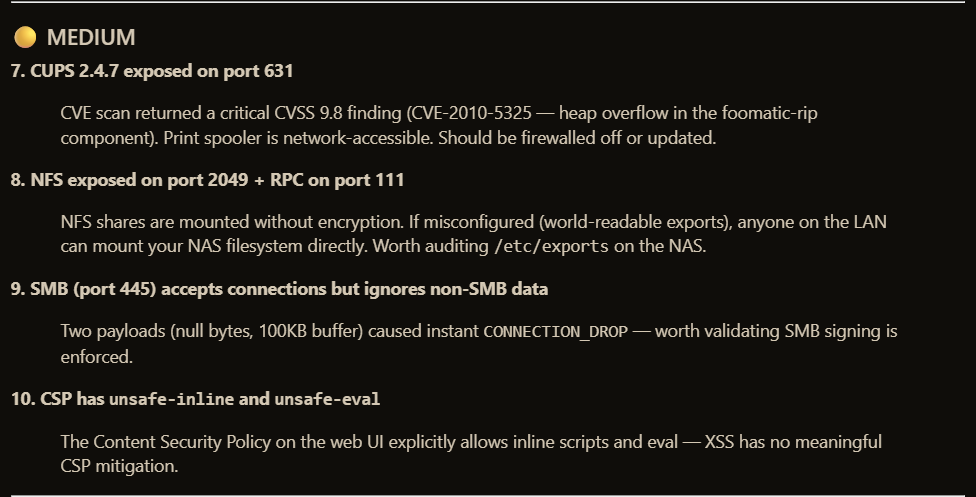
NAS security assessment showing medium severity findings including CUPS CVE-2010-5325 with CVSS score 9.8, NFS shares unencrypted, SMB connection drops, and CSP with unsafe-inline and unsafe-eval
Medium
CUPS CVE-2010-5325 (CVSS 9.8) — NFS — SMB — CSP bypass
4 MEDIUM — CVE CVSS 9.8
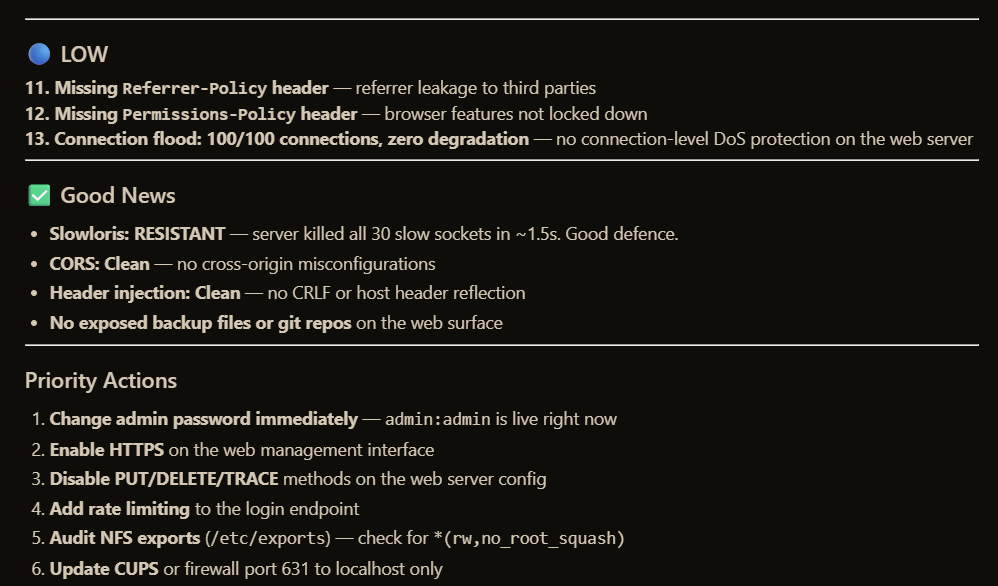
NAS security assessment showing low severity header findings, confirmed clean items including Slowloris resistance and CORS clean, and a prioritised six-item action list
Low, Good News & Priority Actions
Headers — Slowloris resistant — CORS clean — 6-item fix list
6 PRIORITY ACTIONS
Honest context: This is an unpatched home NAS running with factory defaults — a deliberately soft target. The point is that the agent found, classified, and explained all 13 findings itself, generated the remediation priority list, and knew which CVEs to pull. You drive the tools; the agent does the thinking.

Network Monitor

Four live views. Everything on your network.

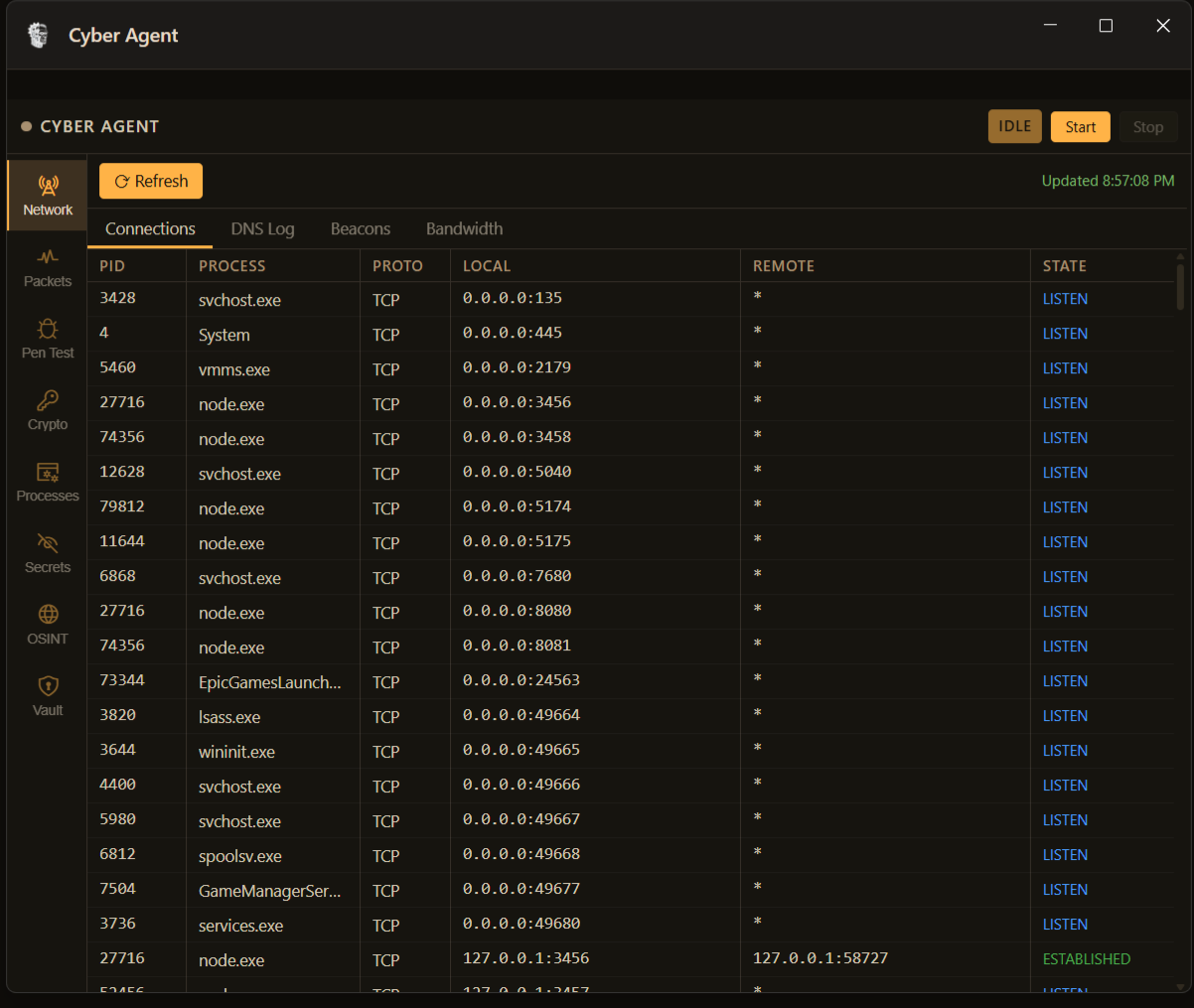
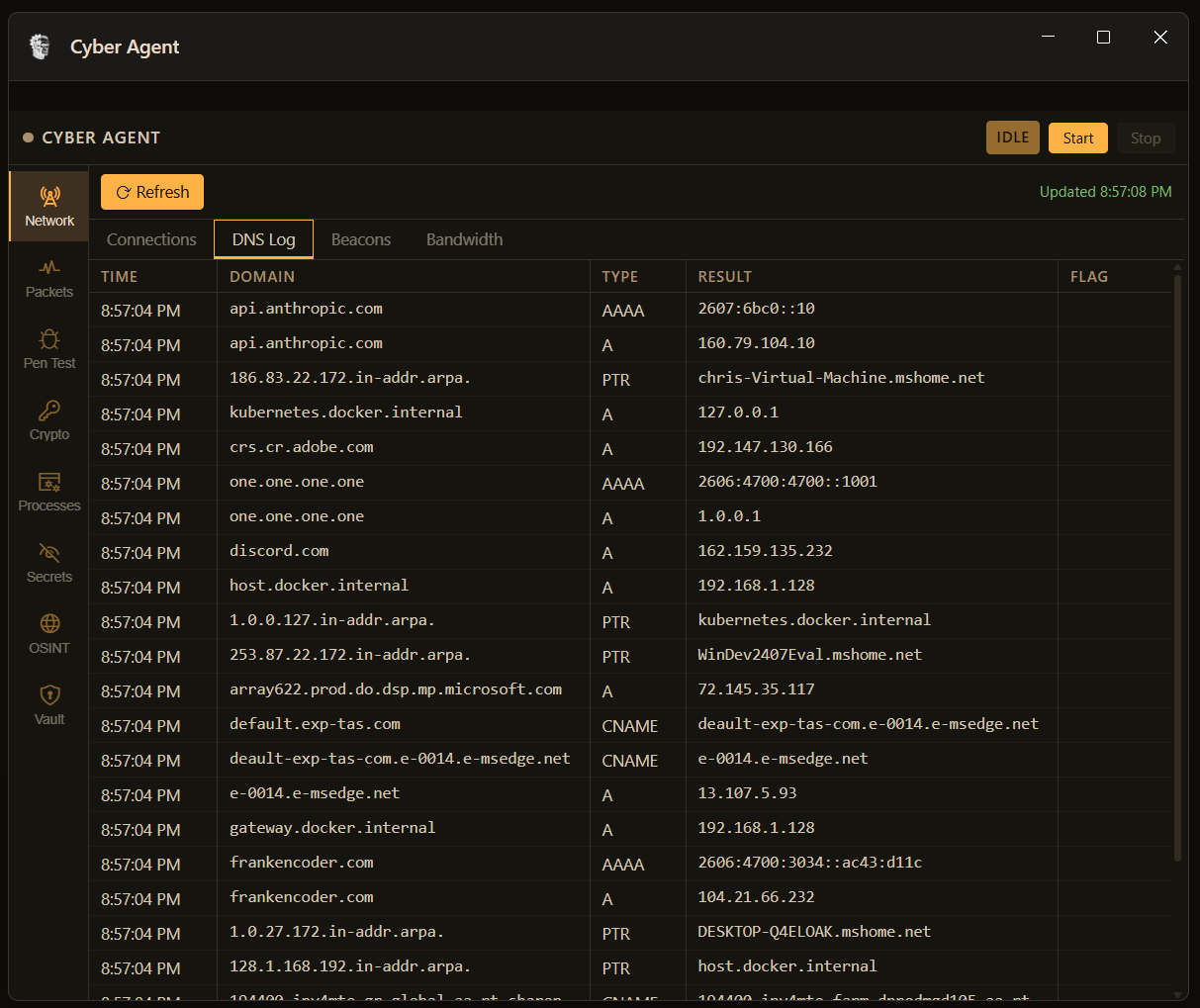
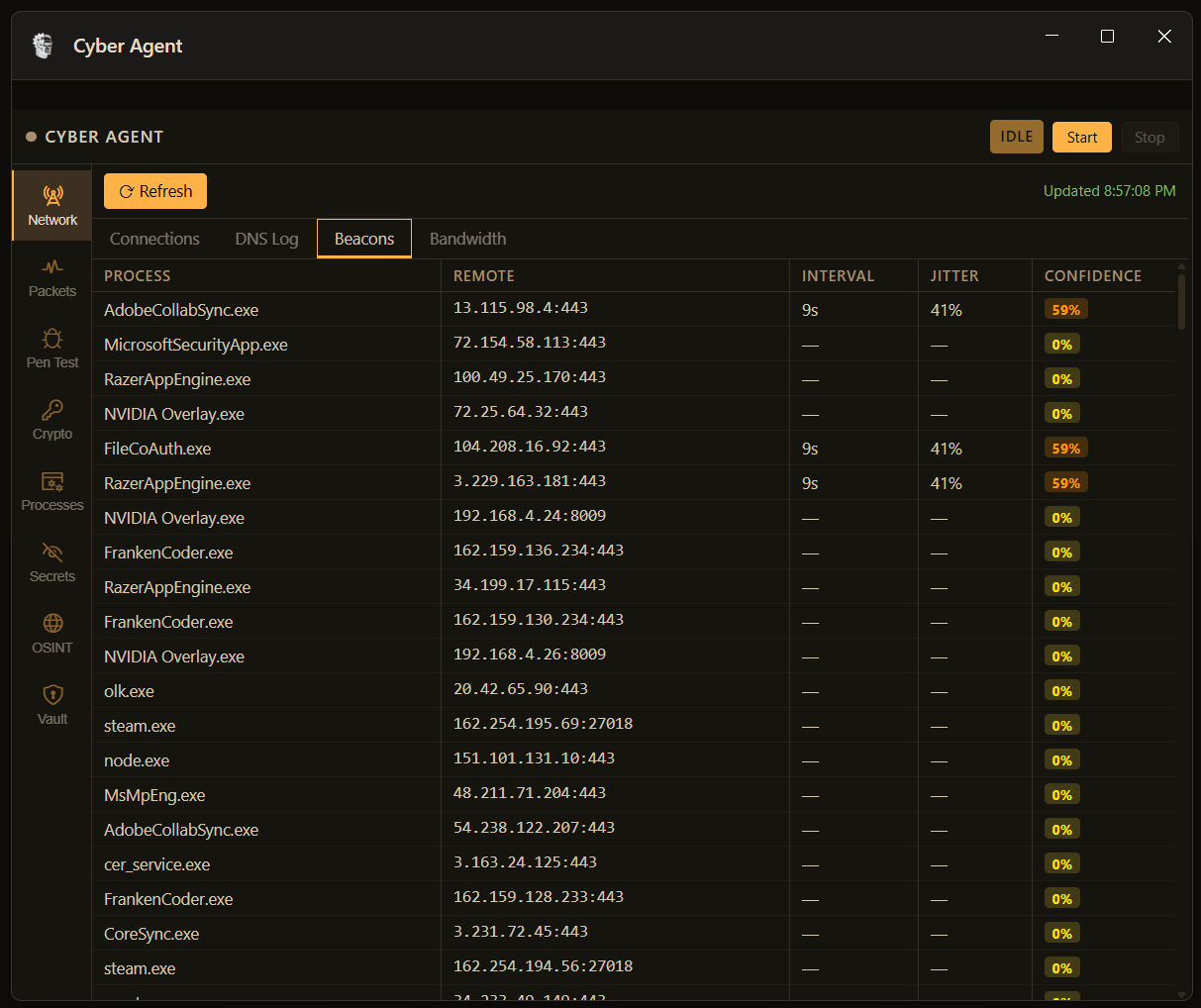
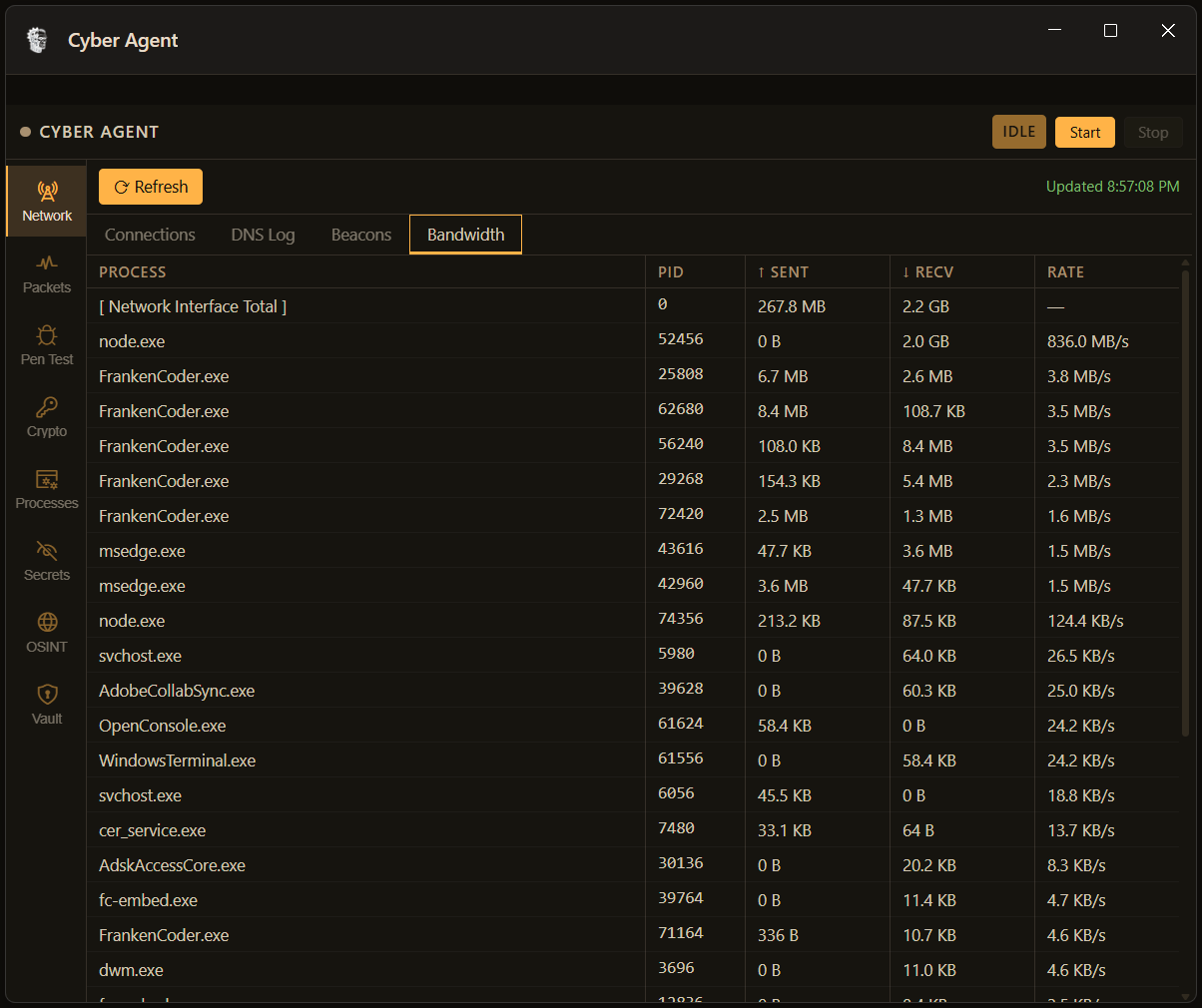
The Network tab gives you four real-time panes: every active connection with process and PID, a full DNS query log, a beacon detector that scores periodic traffic for C2 patterns, and per-process bandwidth. All updating continuously, all queryable by the agent.

FrankenCoder network connections tab showing live TCP table with PID, process name, local and remote address, and connection state in blue for LISTEN and green for ESTABLISHED
Connections
Live TCP/UDP table — PID, process, state (LISTEN / ESTABLISHED)
FrankenCoder DNS log showing real DNS queries including api.anthropic.com, frankencoder.com, discord.com and kubernetes docker internal with A AAAA PTR and CNAME record types
DNS Log
Live DNS query log — A, AAAA, PTR, CNAME records with timestamps
FrankenCoder beacon detector showing AdobeCollabSync FileCoAuth and RazerAppEngine flagged at 59 percent confidence with 9 second interval and 41 percent jitter matching C2 beacon patterns
Beacon Detector
C2 confidence scoring — AdobeCollabSync at 59% — 9s interval, 41% jitter
FrankenCoder bandwidth monitor showing per-process network sent and received with rate column sorted by traffic volume including FrankenCoder node and msedge processes
Bandwidth
Per-process sent / recv / rate — sorted by traffic volume

Tools in Action

Secret scanner. OSINT. Packet capture. Process monitor.

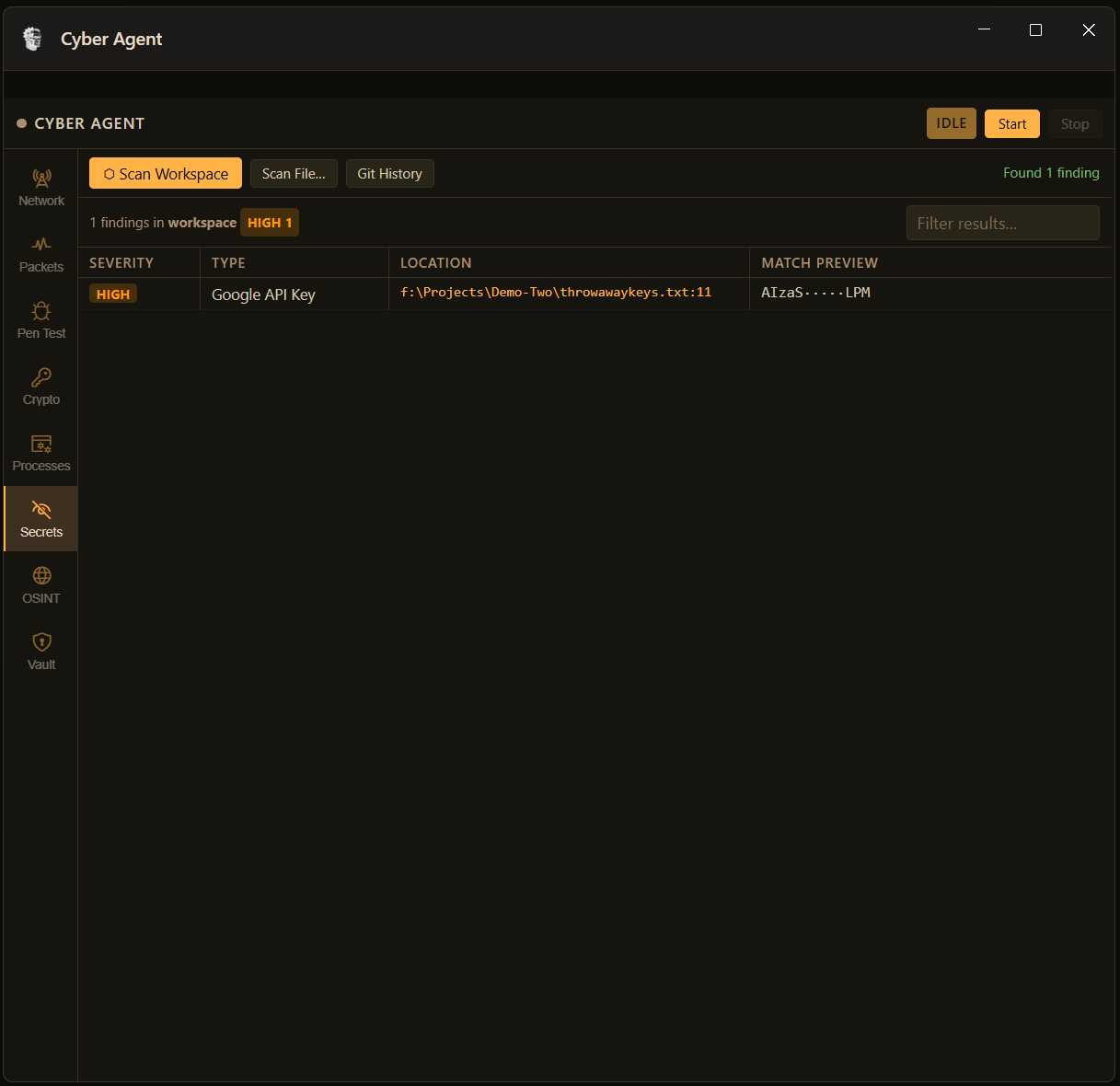
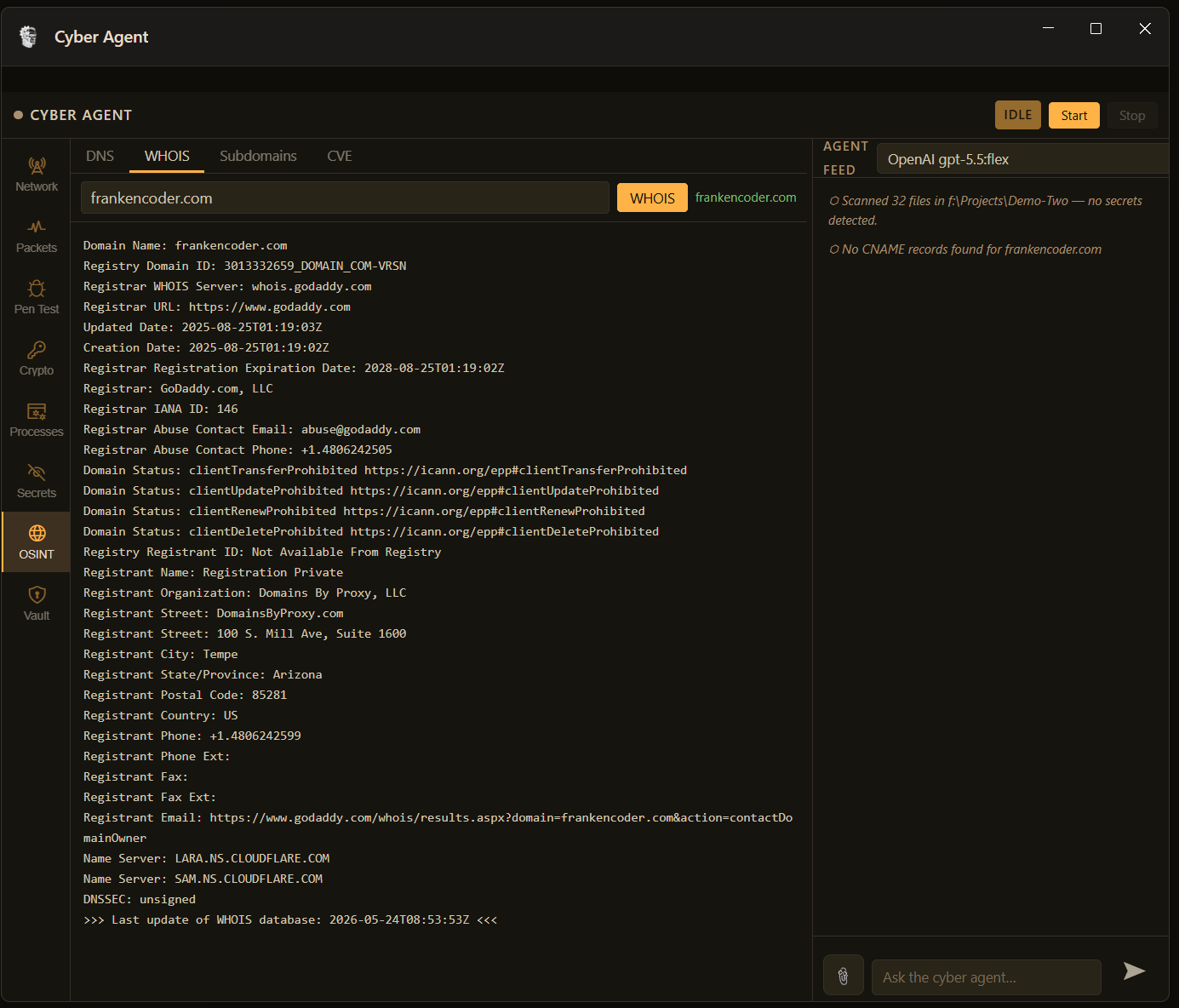
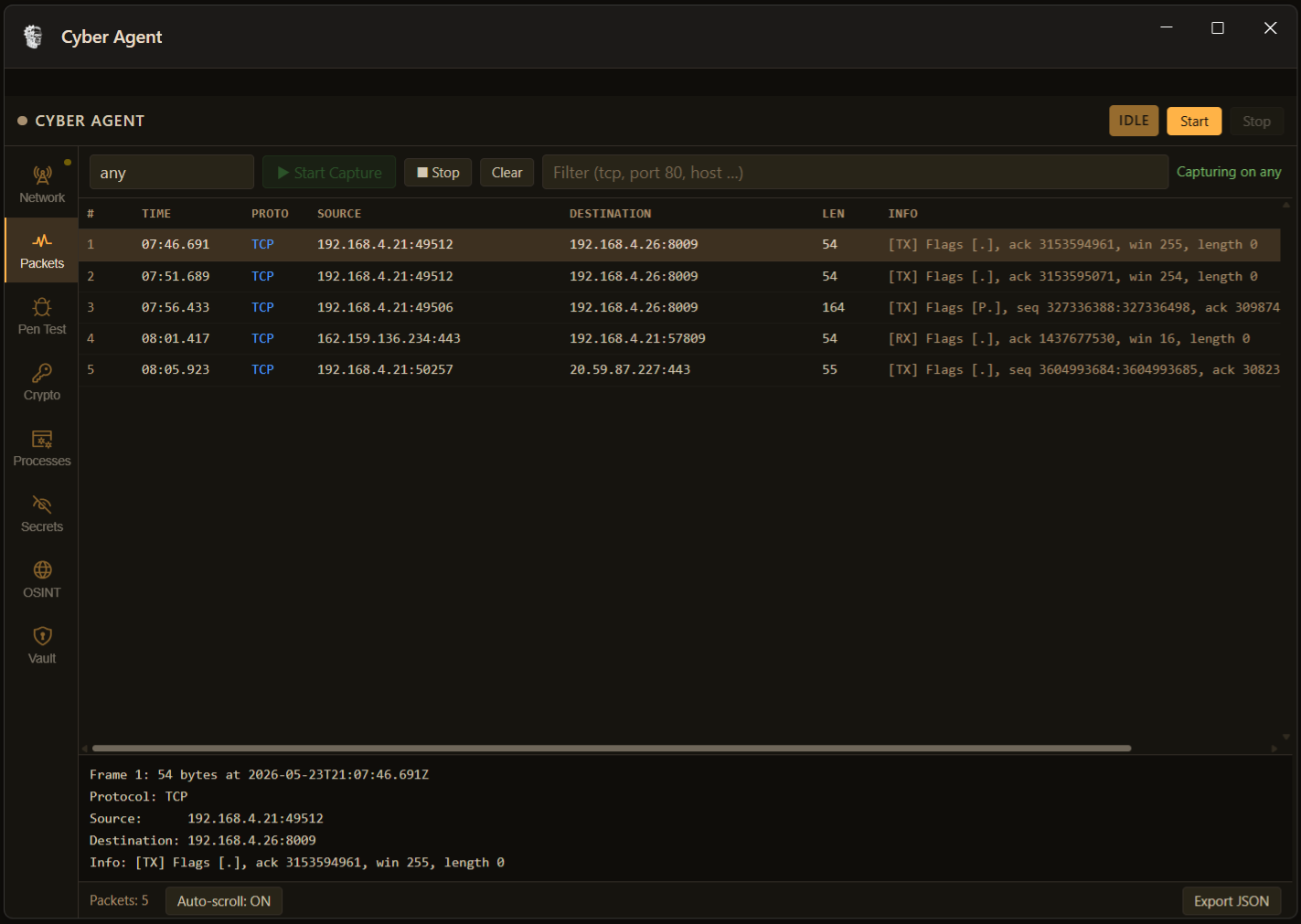
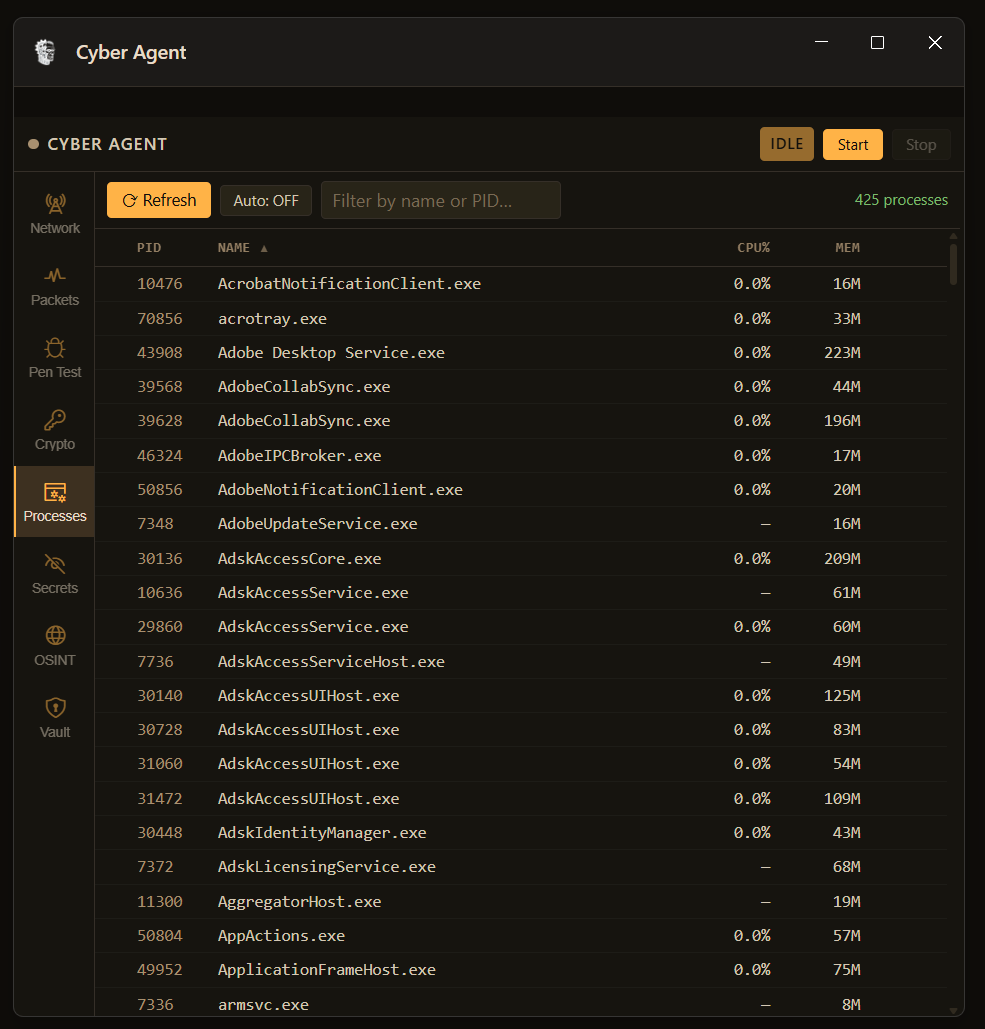
94 tools, one conversation away. These four show the breadth: finding a live Google API key in a code repo, running a full WHOIS on any domain, capturing and decoding raw network packets, and monitoring every running process with CPU and memory in real time.

FrankenCoder secret scanner showing a Google API key found at HIGH severity in throwawaykeys.txt line 11 with the key partially redacted as AIzaS dotted LPM
Secret Scanner
Google API key found — HIGH — throwawaykeys.txt:11
HIGH FINDING
FrankenCoder OSINT tab showing a complete WHOIS result for frankencoder.com including registrar GoDaddy, Cloudflare nameservers, domain privacy enabled via Domains By Proxy, and all four domain lock statuses
OSINT — WHOIS
frankencoder.com — GoDaddy / Cloudflare NS
LIVE QUERY
FrankenCoder packet inspector showing live TCP packet capture with TX and RX direction colour coding, frame detail panel at the bottom, and export JSON option
Packet Inspector
Live TCP capture — TX/RX coloured — payload decode
LIVE CAPTURE
FrankenCoder process monitor showing 425 running processes with PID, name, CPU percentage, and memory columns, sortable and filterable
Process Monitor
425 processes — PID / name / CPU% / mem — filter, sort, refresh
425 PROCESSES

7-Tab Cyber Workbench

The panel docks as a floating aux window over your workspace. Each tab is a standalone tool you can use manually or hand to the agent.

Network Monitor
Live TCP/UDP connection map, DNS query log, per-process traffic breakdown
Packet Inspector
Protocol-coloured packet capture stream, header decode, payload preview
Port Scanner
TCP SYN scanner with service fingerprinting and banner grab
CVE Lookup
Query by service, version, or port — agent auto-correlates scan findings
Secret Scanner
Scans workspace files and git history for hardcoded credentials, API keys, and tokens
Pen Test Suite
HTTP method probing, rate-limit testing, Slowloris, CORS, CSP, header injection
Agent Feed
SOC-style chronological event stream — every tool call logged in order

94 Agent Tools

The Cyber Agent calls these directly. You can also invoke any tool by name in the chat. Categories reflect how the agent reasons about scope — it picks the right tool for the right phase without you having to specify.

Reconnaissance

cyber_port_scan
TCP SYN scanner with configurable port ranges and timeout
cyber_service_fingerprint
Banner grab and service version detection on open ports
cyber_dns_enum
A, AAAA, MX, TXT, NS, SOA, CNAME record enumeration
cyber_subdomain_brute
Subdomain discovery against a wordlist with DNS resolution
cyber_whois
WHOIS lookup with registrar, creation date, and contact extraction
cyber_traceroute
ICMP/UDP traceroute with hop latency and ASN resolution
cyber_ping_sweep
ICMP sweep across a CIDR range to map live hosts
cyber_os_detect
TTL and TCP stack fingerprinting to estimate remote OS

Web & HTTP Testing

cyber_http_methods
Probe all HTTP methods — found PUT/DELETE/TRACE on the NAS above
cyber_header_audit
Check for HSTS, CSP, X-Frame, referrer-policy, and permissions-policy
cyber_cors_check
CORS misconfiguration probe — arbitrary origin, null origin, credential leak
cyber_csp_audit
CSP policy parse — flags unsafe-inline, unsafe-eval, and wildcard sources
cyber_rate_limit_test
Flood a login endpoint and measure 429 / Retry-After behaviour
cyber_slowloris
Slow-socket DoS test against a web server
cyber_dir_brute
Directory and file enumeration against a web root
cyber_header_inject
CRLF and host-header injection probe
cyber_default_creds
Default credential check against common device admin interfaces
cyber_tls_audit
TLS version, cipher suite, certificate validity, and expiry check
cyber_cookie_audit
Check Set-Cookie flags — Secure, HttpOnly, SameSite
cyber_open_redirect
Detect unvalidated redirect parameters in web applications

Vulnerability & CVE

cyber_cve_lookup
NVD query by CVE ID — returns CVSS score, vector, and description
cyber_vuln_scan
Service-to-CVE correlation using version and port data
cyber_exploit_search
ExploitDB search for public PoC matching a CVE or service
cyber_smb_check
SMB signing, version, and null session probe
cyber_nfs_check
NFS export enumeration and world-readable share detection
cyber_cups_check
CUPS service detection and CVE cross-reference on port 631
cyber_ftp_check
Anonymous FTP login and banner version probe
cyber_ssh_audit
SSH version, key exchange algorithms, and weak cipher detection
cyber_rdp_check
RDP exposure detection and NLA enforcement check
cyber_telnet_check
Telnet banner grab and plaintext exposure flag

OSINT & Intelligence

cyber_virustotal_file
VirusTotal hash scan — 70+ AV engine results returned in chat
cyber_virustotal_url
VirusTotal URL scan with category and threat label
cyber_virustotal_ip
VirusTotal IP reputation with ASN and passive DNS history
cyber_shodan_host
Shodan host lookup — open ports, banners, and known vulnerabilities
cyber_ip_reputation
AbuseIPDB and threat intel feed query for malicious IP scoring
cyber_email_breach
HaveIBeenPwned check for a given email address
cyber_geo_ip
IP geolocation with ISP, org, and country resolution
cyber_cert_search
crt.sh certificate transparency log search for a domain

Network & Traffic

cyber_packet_capture
Live packet capture on a named interface with BPF filter support
cyber_pcap_analyse
Parse a PCAP file — summarise flows, extract credentials, flag anomalies
cyber_arp_scan
LAN ARP sweep — discover hosts and resolve MAC to vendor
cyber_connection_map
Snapshot all active TCP/UDP connections on the local machine
cyber_dns_query
Direct DNS query to a specified resolver with full answer section
cyber_tcp_connect
Raw TCP connect test with configurable payload and response capture

Malware & File Analysis

cyber_pe_analyse
PE header parse — imports, sections, entropy, packer detection
cyber_strings_extract
Extract printable strings from a binary with entropy scoring
cyber_yara_scan
Run a YARA ruleset against a file or directory
cyber_hash_file
MD5, SHA1, SHA256, SHA512 in one call
cyber_sandbox_detonate
Submit a file to a configured sandbox and retrieve the behaviour report
cyber_entropy_check
Block entropy analysis to detect packed or encrypted sections
cyber_import_check
Flag suspicious Win32 API imports — injection, keylogging, C2 indicators

System & Host

cyber_process_list
Running process snapshot with PID, parent, path, and hash
cyber_process_watch
WMI event subscription for new process creation
cyber_autorun_audit
Enumerate persistence locations — registry run keys, scheduled tasks, services
cyber_lolbin_check
Flag known living-off-the-land binary misuse patterns in process tree
cyber_event_log
Windows event log query with filter by event ID and time range
cyber_firewall_rules
List active Windows firewall rules and flag inbound allows
cyber_user_audit
Local account enumeration — active users, last logon, group membership
cyber_share_audit
Network share enumeration with access control list summary
cyber_secret_scan
Regex-based workspace scan for keys, tokens, connection strings
cyber_git_secret_scan
Walk full git history scanning every commit for leaked secrets

Reporting

cyber_report_generate
Produce a structured markdown security report from all session findings
cyber_finding_classify
CVSS-based severity classification for a described finding
cyber_remediation_plan
Generate a prioritised fix list from the current session findings

Real-Time Threat Watcher

The Watcher is a background service that monitors the local machine continuously using WMI event subscriptions. It does not block your workflow — it watches while you code. When something crosses a threshold it fires a persistent toast with a one-click path into the Cyber Agent to investigate.

What this is not: This is not an EDR or a managed SIEM. It does not persist detections across reboots, does not ship telemetry anywhere, and does not replace a dedicated endpoint security product for production environments. It is an AI-powered security workbench for developers who need to understand what is happening on their machine or network while they build.

Crypto Utilities

Hash. Encode. HMAC. Built in, offline, instant.

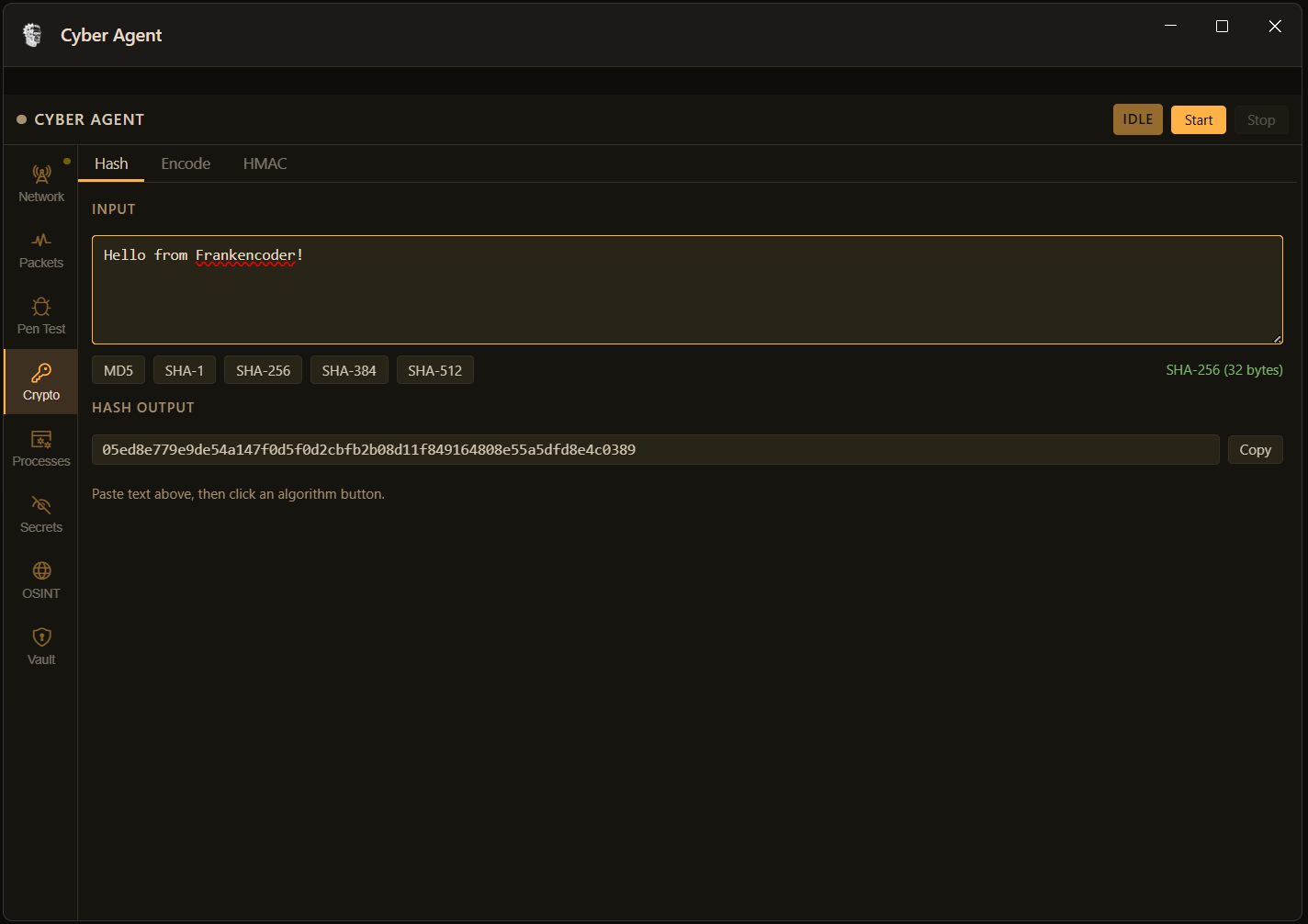
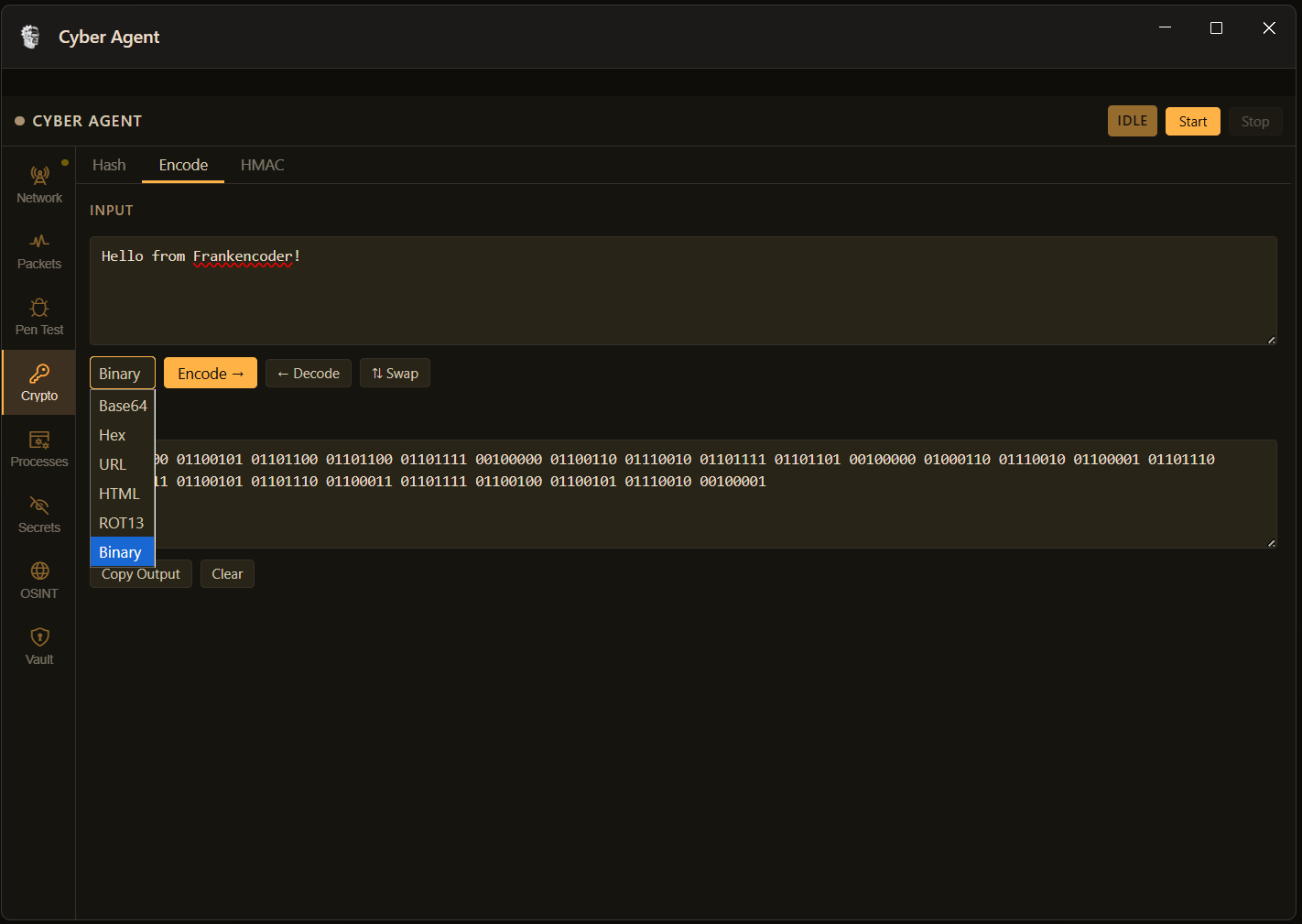
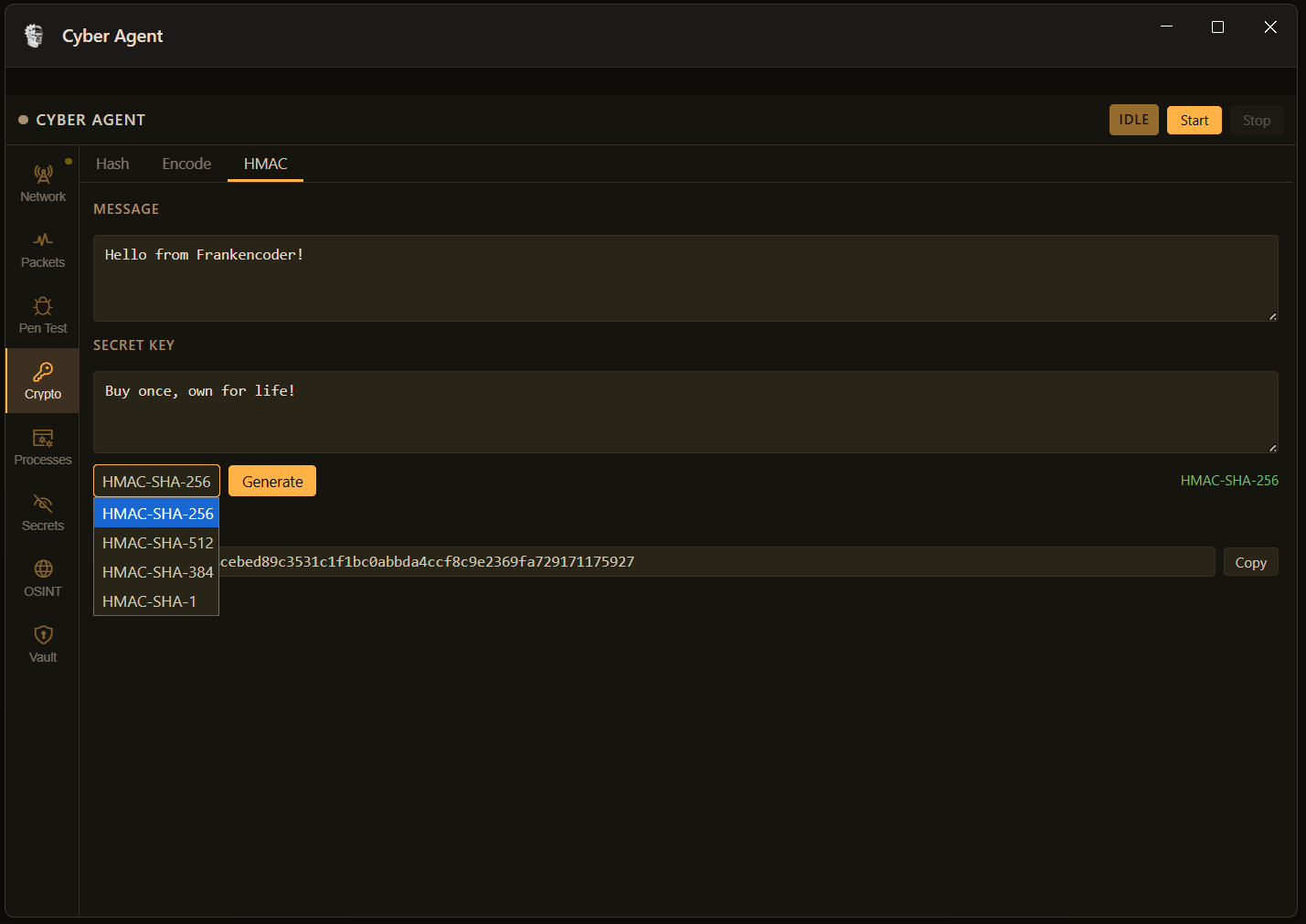
The Crypto tab gives you the primitives you reach for mid-analysis: multi-algorithm hashing, encode/decode across Base64/Hex/URL/HTML/ROT13/binary, and HMAC generation with a secret key. No browser, no external service. All computed locally.
FrankenCoder Crypto hash tab showing SHA-256 output for a test string with algorithm selector buttons for MD5 SHA-1 SHA-256 SHA-384 and SHA-512
Hash
MD5 / SHA-1 / SHA-256 / SHA-384 / SHA-512 — one click
OFFLINE
FrankenCoder Crypto encode tab showing binary encoding of test text with dropdown open showing Base64 Hex URL HTML ROT13 and Binary options plus Encode Decode and Swap buttons
Encode / Decode
Base64, Hex, URL, HTML, ROT13, Binary — encode or decode, swap in one click
OFFLINE
FrankenCoder Crypto HMAC tab showing HMAC-SHA-256 generation with message and secret key inputs and algorithm dropdown showing SHA-256 SHA-512 SHA-384 and SHA-1 options
HMAC
HMAC-SHA-256 / SHA-384 / SHA-512 / SHA-1 — message + secret key
OFFLINE
"Found admin:admin on a live NAS on the first attempt. That's not a demo — that's Tuesday."
— from an actual audit session

Start auditing your network

94 tools. One conversation. Real findings.

Buy Now — $79 ← Explore More Features